Joining the Real Deal Network transformed my real estate journey by surrounding me with real people and real strategies that helped me confidently hunt for off-market deals, analyze numbers, and sharpen my investing skills. The weekly live events and supportive community gave me the encouragement and tools I needed to take action and start seeing real progress in my deals and mindset. If you’re ready to grow with a group that actively helps you learn, connect, and take steps toward financial success in real estate, this network is a game-changer worth exploring.
Ryan Andersen
Golden, CO
Ryan Andersen did not start out chasing freedom. He started by chasing understanding. After years in finance and a decision to invest in real estate in 2007, one small property turned into a growing portfolio, then into a system, and eventually into a lifestyle most people think is out of reach.
Through creative deals, long term rentals, and hands on management, Ryan learned that real estate was not just about properties. It was about leverage, patience, and building income that works whether you are present or not. Over time, that income created options. Since the beginning of 2022, those options have allowed him to live overseas while his rentals continue to serve families and produce steady cash flow.
Today, Ryan shares what he has learned so others can shorten their learning curve, avoid costly mistakes, and realize that financial freedom is not a dream. It is a skill that can be learned and applied with the right guidance
Scott Eagleson
H, NH
I have been an athlete all of my life. Wanted to be a contractor most of my life. When it was college time the schools that I was interested in were out west in the rockies so I could ski as well as play football and baseball. When a baseball scholarship from a FL school fell through in High School due to bad decisions it became clear that I was bound for a Junior College. Did so for two years when Colorado State contacted the Coaches at the JuCo that they would like me to attend and play. Did so. Had an extremely successful working career with 24 years of business ownership and entrepreneurism. In 2007 dropped of a brain aneurysm that took me quite some time to learn to walk, count and function, but it was my last W-2 paycheck. I had purchased 14 units by the time that I got sick and during the 2008 downturn since I was not an educated investor I sold most of my units. I wish that I had met Renatus and this community prior to being a retail buyer. My net worth would be five fold. I now find that I have two years before my wife retires and the entire household expense is mine. Looking forward to having this community RDN and Renatus guide my way!!
Hardy Evans
Hazel Crest, IL
I got involved in real estate investing in the late 1997 while employed at the United States Postal Service, with a plan to resign after 10 years and use real estate as my retirement tool. Things was going as planned, I had acquired four single family rentals, and was starting the process of being the bank to my tenant, even though I really didn't I wasn't sure of how it worked. Then life happened, I went through a divorce and filed bankruptcy where i gave up everything except my personal home. I thank GOD for leading me to this community and the education offered here, now I'm learning from and being encouraged by like minded people who have been more than just supportive.
Phillip Taylor
Chicago, IL
I was born on the westside of Chicago, grew up on the southside as my parents were trailblazers in their own rite. I played H.S. football and attended college briefly, while becoming aware of real estate investing at an early age. I partnered with my parents to embark on the journey of real estate investing together.
We did well, purchasing several properties for great ROI's and solid financial gains. I got married, inherited a 14 year old son, then having 5 more children together. After pursuing several business opportunities, I joined this awesome community in 2012. As I learned and studied, there were several years of inconsistent progress, lots of personal growth and mind-set adjustments, changes occurred in my life. I have found my way back to this incredible community, RealDeal Network to start over and Clock In! My Brow May Be Bloodied, But I Live To Fight Another Day!
Dyanne Lewis
Rosedale, MD
I was born in Friars Hill, West Virginia, in a place marked by poverty, instability, and hardship. From a young age I learned how to protect my siblings and how to stay aware in an environment where safety was never certain. Those early years taught me resilience, responsibility, and the ability to read people and situations with clarity.
Life brought another turning point when I became a single mother raising five children. I needed work that allowed me to be present for them, so I built a life around their needs and my determination to give them stability. Every step forward required me to overcome the negative conditioning of my past and learn how to trust myself. That inner work took time, but it changed everything. I discovered that I am not defined by where I started. I can create the person I choose to become.
These experiences shaped the way I approach real estate today. I understand what it feels like to face difficult transitions. I know what it means to stand at a crossroads and not know who to trust. I know how overwhelming it can be to make decisions that affect your home, your family, and your future.
This is why I work the way I do. I guide people through real estate situations that feel heavy or confusing. I bring clarity where there is uncertainty. I bring calm where there is stress. I help people move forward with dignity and choice because I know how important it is to feel seen and supported during major life changes.
My story taught me that transformation is possible. My work allows me to help others experience their own transformation. I serve with compassion, strength, and a deep belief that people deserve honesty, clarity, and real solutions when they are facing some of the hardest decisions of their lives.
This is who I am. This is why I do the work I do.
Welcome to REALDEAL Network
Follow the path below to join our community for free and get access to real investors, live workshops, property tours, practical tools, and personal guidance. Watch the short video below to learn about our community and find out how it all works.
1,885 Active MembersBuilding Wealth Since 200810+ Weekly Events100% Real People
1
1.
Connect with Investors
Included Free
Meet real members actively learning,investing, and building relationshipswith people across the country.
Browse real member profiles
Message investors inside REALDEAL
Network online and in person
2.
Your Concierge Call
Included Free
Talk one-on-one with a real concierge.Share your goals, questions, and concerns.Get a clear and personalized next step.
Talk with a real person
Clarify your investing goals
Get a personalized next step
3.
Workshops and Tours
Included Free
Learn with investors in live workshops.Join property tours and ask questions.Learn together with real people, not AI.
Attend live weekly workshops
Tour real investment properties
Ask questions and learn together
2
Scott Eagleson
H, NH
I have been an athlete all of my life. Wanted to be a contractor most of my life. When it was college time the schools that I was interested in were out west in the rockies so I could ski as well as play football and baseball. When a baseball scholarship from a FL school fell through in High School due to bad decisions it became clear that I was bound for a Junior College. Did so for two years when Colorado State contacted the Coaches at the JuCo that they would like me to attend and play. Did so. Had an extremely successful working career with 24 years of business ownership and entrepreneurism. In 2007 dropped of a brain aneurysm that took me quite some time to learn to walk, count and function, but it was my last W-2 paycheck. I had purchased 14 units by the time that I got sick and during the 2008 downturn since I was not an educated investor I sold most of my units. I wish that I had met Renatus and this community prior to being a retail buyer. My net worth would be five fold. I now find that I have two years before my wife retires and the entire household expense is mine. Looking forward to having this community RDN and Renatus guide my way!!
1,885 members already inside · most join in under 60 seconds
READY FOR MORE?
Your Discovery Journey
4.
Discovery Month
$1 First Month
Get access to our entire community.Start for only $1 to see if you like it.$147/month only if you decide to stay.
Unlock your Discovery Month
Explore deeper member benefits
Start your next phase with confidence
5.
One-on-One Clarity Call
Included with Discovery Month
Meet privately with a REALDEAL guide.Talk through your goals and roadblocks.Leave with a focused plan for action.
Personalized goal review
Answers to your questions
Clear and practical next steps
6.
Full Investor Toolbox
Included with Discovery Month
Unlock the complete investor ToolSuite.Analyze markets, deals, and financing.Build stronger plans with better data.
Market and deal analyzers
Funding tools and resources
Business planning tools
PROFESSIONAL GRADE TOOLS
The Investor's Toolbox
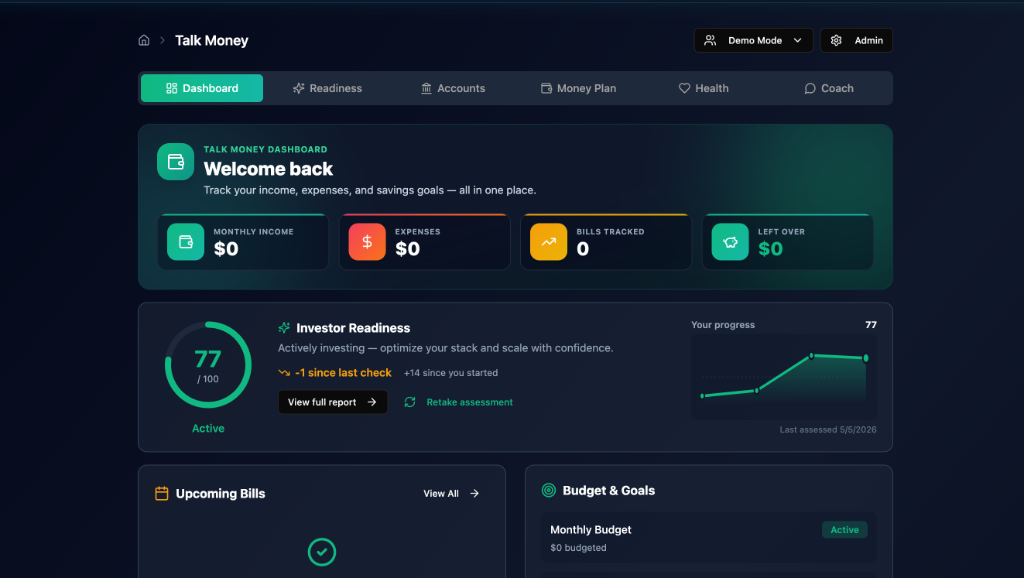
Fix your money → without the shame
Talk Money
An AI money coach that builds budgets, tracks bills, and rewires your relationship with money.
What it helps you do
Smart budgeting
Bill autopilot
AI coach chat
1,885 members already inside · most join in under 60 seconds
READY TO HANG OUT WITH US?
Experience the Power of REALDEAL Network
7.
Intensives
First One Is On Us
Start with a focused single-day deep dive.Learn one topic with real guidance.Your first Intensive is completely free.
Single-day focused training
Practical expert guidance
First Intensive included free
8.
Boot Camps
3–5 Day Training
Build momentum through intense training.Go deeper over three to five days.Turn focused learning into practical action.
Three to five days of training
Step-by-step skill building
Focused implementation support
9.
Challenges
Weeks-Long Journey
Keep growing through weeks of training.Complete guided activities every day.Build lasting skills one step at a time.
Weeks of guided training
Daily learning activities
Consistent progress and practice
Don't Miss Out
Our Next Intensive
Oct 17, 2026 • 3:00 PM
Building from the Ground Up Intensive
Featured Speaker
Bill Predebon
Bill Predebon has progressed from being broke, with no money or credit, to becoming an experienced and successful real estate investor, construction expert, and educator.He has completed more than 250 real estate transactions, including over 150 fix and flips.For the past five years, Bill has focused primarily on ground-up construction and building spec homes as an investor.Known for his Ground Up strategy, he teaches investors how to identify opportunities, replace outdated properties with high-value new construction, and build long-term wealth through real estate.
Ready to be there with us?
Come join the REALDEAL community to attend this Intensive and be part of more events like it.
"Ryan Andersen did not start out chasing freedom. He started by chasing understanding. After years in finance and a decision to invest in real estate in 2007, one small property turned into a growing portfolio, then into a system, and eventually into a lifestyle most people think is out of reach.
Through creative deals, long term rentals, and hands on management, Ryan learned that real estate was not just about properties. It was about leverage, patience, and building income that works whether you are present or not. Over time, that income created options. Since the beginning of 2022, those options have allowed him to live overseas while his rentals continue to serve families and produce steady cash flow.
Today, Ryan shares what he has learned so others can shorten their learning curve, avoid costly mistakes, and realize that financial freedom is not a dream. It is a skill that can be learned and applied with the right guidance"
Ryan Andersen
Golden, CO
"I have been an athlete all of my life. Wanted to be a contractor most of my life. When it was college time the schools that I was interested in were out west in the rockies so I could ski as well as play football and baseball. When a baseball scholarship from a FL school fell through in High School due to bad decisions it became clear that I was bound for a Junior College. Did so for two years when Colorado State contacted the Coaches at the JuCo that they would like me to attend and play. Did so. Had an extremely successful working career with 24 years of business ownership and entrepreneurism. In 2007 dropped of a brain aneurysm that took me quite some time to learn to walk, count and function, but it was my last W-2 paycheck. I had purchased 14 units by the time that I got sick and during the 2008 downturn since I was not an educated investor I sold most of my units. I wish that I had met Renatus and this community prior to being a retail buyer. My net worth would be five fold. I now find that I have two years before my wife retires and the entire household expense is mine. Looking forward to having this community RDN and Renatus guide my way!!"
Scott Eagleson
H, NH
"I got involved in real estate investing in the late 1997 while employed at the United States Postal Service, with a plan to resign after 10 years and use real estate as my retirement tool. Things was going as planned, I had acquired four single family rentals, and was starting the process of being the bank to my tenant, even though I really didn't I wasn't sure of how it worked. Then life happened, I went through a divorce and filed bankruptcy where i gave up everything except my personal home. I thank GOD for leading me to this community and the education offered here, now I'm learning from and being encouraged by like minded people who have been more than just supportive."
Hardy Evans
Hazel Crest, IL
"I was born on the westside of Chicago, grew up on the southside as my parents were trailblazers in their own rite. I played H.S. football and attended college briefly, while becoming aware of real estate investing at an early age. I partnered with my parents to embark on the journey of real estate investing together.
We did well, purchasing several properties for great ROI's and solid financial gains. I got married, inherited a 14 year old son, then having 5 more children together. After pursuing several business opportunities, I joined this awesome community in 2012. As I learned and studied, there were several years of inconsistent progress, lots of personal growth and mind-set adjustments, changes occurred in my life. I have found my way back to this incredible community, RealDeal Network to start over and Clock In! My Brow May Be Bloodied, But I Live To Fight Another Day!"
Phillip Taylor
Chicago, IL
"I was born in Friars Hill, West Virginia, in a place marked by poverty, instability, and hardship. From a young age I learned how to protect my siblings and how to stay aware in an environment where safety was never certain. Those early years taught me resilience, responsibility, and the ability to read people and situations with clarity.
Life brought another turning point when I became a single mother raising five children. I needed work that allowed me to be present for them, so I built a life around their needs and my determination to give them stability. Every step forward required me to overcome the negative conditioning of my past and learn how to trust myself. That inner work took time, but it changed everything. I discovered that I am not defined by where I started. I can create the person I choose to become.
These experiences shaped the way I approach real estate today. I understand what it feels like to face difficult transitions. I know what it means to stand at a crossroads and not know who to trust. I know how overwhelming it can be to make decisions that affect your home, your family, and your future.
This is why I work the way I do. I guide people through real estate situations that feel heavy or confusing. I bring clarity where there is uncertainty. I bring calm where there is stress. I help people move forward with dignity and choice because I know how important it is to feel seen and supported during major life changes.
My story taught me that transformation is possible. My work allows me to help others experience their own transformation. I serve with compassion, strength, and a deep belief that people deserve honesty, clarity, and real solutions when they are facing some of the hardest decisions of their lives.
This is who I am. This is why I do the work I do.
"
Dyanne Lewis
Rosedale, MD
"Joining the Real Deal Network transformed my real estate journey by surrounding me with real people and real strategies that helped me confidently hunt for off-market deals, analyze numbers, and sharpen my investing skills. The weekly live events and supportive community gave me the encouragement and tools I needed to take action and start seeing real progress in my deals and mindset. If you’re ready to grow with a group that actively helps you learn, connect, and take steps toward financial success in real estate, this network is a game-changer worth exploring."
Keith Jones
Lake Ridge, VA
"I didn’t come to the Real Deal Network looking for hype—I came looking for clarity.
Like many people, I had heard plenty of talk about investing, wealth, and “financial freedom,” but it always felt distant, complicated, or meant for someone else. From the moment I stepped into the Real Deal Network, that narrative began to change. What stood out first wasn’t just the education—it was the people. Real conversations. Real experiences. Real wins and lessons shared without pretense.
The Real Deal Network met me where I was. Concepts that once felt overwhelming became practical and actionable. Instead of being told what *should* work, I was shown what *does* work, backed by experience and a community willing to support each step forward. I stopped guessing and started moving with intention.
What truly transformed my experience was the sense of ownership the Network instilled in me. I wasn’t just learning about opportunities—I was learning how to think differently, how to evaluate deals, and how to build long-term strategies rooted in cash flow and sustainability. Confidence replaced hesitation.
Today, when I reflect on my journey with the Real Deal Network, I see more than education or access—I see growth. I see alignment. I see a network that lives up to its name by keeping it real, honest, and results-focused.
The Real Deal Network didn’t just change how I look at investing—it changed how I see my potential."
Tracey Lewis
Cape Canaveral, FL
"I’m a small-town Southern girl through and through, and community has always meant everything to me. My journey with REALDEAL Network began over 12 years ago in a way I never could have planned. My husband and I were asked to teach a credit workshop, and what started as a simple “yes” turned into something far bigger than we ever imagined, we just never really left.
Over time, REALDEAL Network became much more than a place we showed up to teach a class. It became a community where we built lasting friendships, supported incredible leaders, and watched people grow, not just in business, but in life. My husband went on to become one of the instructors for several classes and has played a meaningful role in helping build the network into what it is today. Watching that growth, and being a small part of it myself, has been incredibly rewarding.
My role here looks a little different than most. I’m part of the administrative team and currently serve as the concierge, which means I’m often one of the first people you’ll meet when you step into this community. I may not be the one on stage leading trainings, but I’m usually close by, working behind the scenes to support leadership and help events and meetings run smoothly. That’s where I feel most at home, making sure people feel welcomed, supported, and taken care of.
What I love most about REALDEAL Network is the people. The conversations, the connections, and the friendships built over the years are what keep me here. I truly believe that when people feel comfortable asking questions and know they have someone in their corner, great things can happen. If I can be that steady, friendly presence, someone you can come to when you’re not sure where to turn, then I know I’m doing exactly what I’m meant to do."
Stephanie Counts
Paragould, AR
"Jean and I started with the education program and its marketing a number of years ago. The education got us through a couple of projects. The last one ended when covid hit, so we stopped and are just now ready to start again. Even though we were associated with the great Rowe team for the marketing, it was just outside our box for us to get really involved. When we re-connected recently, Scott said we would find this process sooo much better. Boy, was he correct. A fully automated funnel that is run by professionals. A community to go through the education together with. The tools we have available in the investing, learning, and marketing make the whole process much, much easier and more enjoyable. This all adds up to quicker and easier success in the marketing and investing."
William Richerson
Arlington, TX
"I thought investing in real estate was a solo business. I searched for the longest time, and all I kept finding were those “circus coming to town” experiences—where someone teaches you a one-man trick, empties your purse, and then leaves you alone to figure out the rest.
Real Deal Network is completely the opposite. This community has inspired me, taken me under its wings, and propelled me to grow.
Another beautiful part of RDN is that it doesn’t only offer online interaction—so many of its members are truly available and willing to connect one-on-one in the areas where they live. I’ve been blessed to meet several community members in person, and many of them I now proudly call my friends."
Ana Catoni Zeppenfeldt
Woodbridge, VA
"I was told to follow the traditional path: go to school, study hard, go to college, get a good job, save money, and retire at 65. I did those things. I became an RN and built a career, but eventually I realized the future I was working toward wasn't the future I wanted. I wanted to live in the mountains, have more freedom, build something of my own, and do it without piling on more debt. For a long time, that felt impossible. Then we found a community that introduced us to ideas about money and building a different kind of life. Since then, we've paid down more than $150,000 in debt through velocity banking, moved to the mountains, and started building businesses of our own.
I'm still very much in the building stage. I'm learning, asking questions, making mistakes, and putting what I learn into practice. Real estate investing is a big part of where I'm headed, with a goal of starting with fix-and-flips and rentals and eventually growing into mobile home parks and larger multifamily properties. But the real estate goals are only part of the picture. One day, I'd love to build a community for people coming out of difficult seasons, including those transitioning out of rehab or incarceration. I believe there is usually more possibility than we can see from where we're standing. I'm still learning how to see it in my own life, and I want to help other people see it in theirs, too.
"
Rachel Murphy
Madisonville, TN
"Loved helping first time home buyers reach their goal of home ownership. Then realized I needed to leave a legacy of real estate for my grandson after my son passed away. I tried a few real estate investment gurus, but got back very little education for a lot of money. Then I found this community and education that met what I needed. My only regret is that I wish I had found this community first and started at an earlier age. But it is never to late to start."
Karen Morrison
Rancho Cordova, CA
"Ryan Andersen did not start out chasing freedom. He started by chasing understanding. After years in finance and a decision to invest in real estate in 2007, one small property turned into a growing portfolio, then into a system, and eventually into a lifestyle most people think is out of reach.
Through creative deals, long term rentals, and hands on management, Ryan learned that real estate was not just about properties. It was about leverage, patience, and building income that works whether you are present or not. Over time, that income created options. Since the beginning of 2022, those options have allowed him to live overseas while his rentals continue to serve families and produce steady cash flow.
Today, Ryan shares what he has learned so others can shorten their learning curve, avoid costly mistakes, and realize that financial freedom is not a dream. It is a skill that can be learned and applied with the right guidance"
Ryan Andersen
Golden, CO
"I have been an athlete all of my life. Wanted to be a contractor most of my life. When it was college time the schools that I was interested in were out west in the rockies so I could ski as well as play football and baseball. When a baseball scholarship from a FL school fell through in High School due to bad decisions it became clear that I was bound for a Junior College. Did so for two years when Colorado State contacted the Coaches at the JuCo that they would like me to attend and play. Did so. Had an extremely successful working career with 24 years of business ownership and entrepreneurism. In 2007 dropped of a brain aneurysm that took me quite some time to learn to walk, count and function, but it was my last W-2 paycheck. I had purchased 14 units by the time that I got sick and during the 2008 downturn since I was not an educated investor I sold most of my units. I wish that I had met Renatus and this community prior to being a retail buyer. My net worth would be five fold. I now find that I have two years before my wife retires and the entire household expense is mine. Looking forward to having this community RDN and Renatus guide my way!!"
Scott Eagleson
H, NH
"I got involved in real estate investing in the late 1997 while employed at the United States Postal Service, with a plan to resign after 10 years and use real estate as my retirement tool. Things was going as planned, I had acquired four single family rentals, and was starting the process of being the bank to my tenant, even though I really didn't I wasn't sure of how it worked. Then life happened, I went through a divorce and filed bankruptcy where i gave up everything except my personal home. I thank GOD for leading me to this community and the education offered here, now I'm learning from and being encouraged by like minded people who have been more than just supportive."
Hardy Evans
Hazel Crest, IL
"I was born on the westside of Chicago, grew up on the southside as my parents were trailblazers in their own rite. I played H.S. football and attended college briefly, while becoming aware of real estate investing at an early age. I partnered with my parents to embark on the journey of real estate investing together.
We did well, purchasing several properties for great ROI's and solid financial gains. I got married, inherited a 14 year old son, then having 5 more children together. After pursuing several business opportunities, I joined this awesome community in 2012. As I learned and studied, there were several years of inconsistent progress, lots of personal growth and mind-set adjustments, changes occurred in my life. I have found my way back to this incredible community, RealDeal Network to start over and Clock In! My Brow May Be Bloodied, But I Live To Fight Another Day!"
Phillip Taylor
Chicago, IL
"I was born in Friars Hill, West Virginia, in a place marked by poverty, instability, and hardship. From a young age I learned how to protect my siblings and how to stay aware in an environment where safety was never certain. Those early years taught me resilience, responsibility, and the ability to read people and situations with clarity.
Life brought another turning point when I became a single mother raising five children. I needed work that allowed me to be present for them, so I built a life around their needs and my determination to give them stability. Every step forward required me to overcome the negative conditioning of my past and learn how to trust myself. That inner work took time, but it changed everything. I discovered that I am not defined by where I started. I can create the person I choose to become.
These experiences shaped the way I approach real estate today. I understand what it feels like to face difficult transitions. I know what it means to stand at a crossroads and not know who to trust. I know how overwhelming it can be to make decisions that affect your home, your family, and your future.
This is why I work the way I do. I guide people through real estate situations that feel heavy or confusing. I bring clarity where there is uncertainty. I bring calm where there is stress. I help people move forward with dignity and choice because I know how important it is to feel seen and supported during major life changes.
My story taught me that transformation is possible. My work allows me to help others experience their own transformation. I serve with compassion, strength, and a deep belief that people deserve honesty, clarity, and real solutions when they are facing some of the hardest decisions of their lives.
This is who I am. This is why I do the work I do.
"
Dyanne Lewis
Rosedale, MD
"Joining the Real Deal Network transformed my real estate journey by surrounding me with real people and real strategies that helped me confidently hunt for off-market deals, analyze numbers, and sharpen my investing skills. The weekly live events and supportive community gave me the encouragement and tools I needed to take action and start seeing real progress in my deals and mindset. If you’re ready to grow with a group that actively helps you learn, connect, and take steps toward financial success in real estate, this network is a game-changer worth exploring."
Keith Jones
Lake Ridge, VA
"I didn’t come to the Real Deal Network looking for hype—I came looking for clarity.
Like many people, I had heard plenty of talk about investing, wealth, and “financial freedom,” but it always felt distant, complicated, or meant for someone else. From the moment I stepped into the Real Deal Network, that narrative began to change. What stood out first wasn’t just the education—it was the people. Real conversations. Real experiences. Real wins and lessons shared without pretense.
The Real Deal Network met me where I was. Concepts that once felt overwhelming became practical and actionable. Instead of being told what *should* work, I was shown what *does* work, backed by experience and a community willing to support each step forward. I stopped guessing and started moving with intention.
What truly transformed my experience was the sense of ownership the Network instilled in me. I wasn’t just learning about opportunities—I was learning how to think differently, how to evaluate deals, and how to build long-term strategies rooted in cash flow and sustainability. Confidence replaced hesitation.
Today, when I reflect on my journey with the Real Deal Network, I see more than education or access—I see growth. I see alignment. I see a network that lives up to its name by keeping it real, honest, and results-focused.
The Real Deal Network didn’t just change how I look at investing—it changed how I see my potential."
Tracey Lewis
Cape Canaveral, FL
"I’m a small-town Southern girl through and through, and community has always meant everything to me. My journey with REALDEAL Network began over 12 years ago in a way I never could have planned. My husband and I were asked to teach a credit workshop, and what started as a simple “yes” turned into something far bigger than we ever imagined, we just never really left.
Over time, REALDEAL Network became much more than a place we showed up to teach a class. It became a community where we built lasting friendships, supported incredible leaders, and watched people grow, not just in business, but in life. My husband went on to become one of the instructors for several classes and has played a meaningful role in helping build the network into what it is today. Watching that growth, and being a small part of it myself, has been incredibly rewarding.
My role here looks a little different than most. I’m part of the administrative team and currently serve as the concierge, which means I’m often one of the first people you’ll meet when you step into this community. I may not be the one on stage leading trainings, but I’m usually close by, working behind the scenes to support leadership and help events and meetings run smoothly. That’s where I feel most at home, making sure people feel welcomed, supported, and taken care of.
What I love most about REALDEAL Network is the people. The conversations, the connections, and the friendships built over the years are what keep me here. I truly believe that when people feel comfortable asking questions and know they have someone in their corner, great things can happen. If I can be that steady, friendly presence, someone you can come to when you’re not sure where to turn, then I know I’m doing exactly what I’m meant to do."
Stephanie Counts
Paragould, AR
"Jean and I started with the education program and its marketing a number of years ago. The education got us through a couple of projects. The last one ended when covid hit, so we stopped and are just now ready to start again. Even though we were associated with the great Rowe team for the marketing, it was just outside our box for us to get really involved. When we re-connected recently, Scott said we would find this process sooo much better. Boy, was he correct. A fully automated funnel that is run by professionals. A community to go through the education together with. The tools we have available in the investing, learning, and marketing make the whole process much, much easier and more enjoyable. This all adds up to quicker and easier success in the marketing and investing."
William Richerson
Arlington, TX
"I thought investing in real estate was a solo business. I searched for the longest time, and all I kept finding were those “circus coming to town” experiences—where someone teaches you a one-man trick, empties your purse, and then leaves you alone to figure out the rest.
Real Deal Network is completely the opposite. This community has inspired me, taken me under its wings, and propelled me to grow.
Another beautiful part of RDN is that it doesn’t only offer online interaction—so many of its members are truly available and willing to connect one-on-one in the areas where they live. I’ve been blessed to meet several community members in person, and many of them I now proudly call my friends."
Ana Catoni Zeppenfeldt
Woodbridge, VA
"I was told to follow the traditional path: go to school, study hard, go to college, get a good job, save money, and retire at 65. I did those things. I became an RN and built a career, but eventually I realized the future I was working toward wasn't the future I wanted. I wanted to live in the mountains, have more freedom, build something of my own, and do it without piling on more debt. For a long time, that felt impossible. Then we found a community that introduced us to ideas about money and building a different kind of life. Since then, we've paid down more than $150,000 in debt through velocity banking, moved to the mountains, and started building businesses of our own.
I'm still very much in the building stage. I'm learning, asking questions, making mistakes, and putting what I learn into practice. Real estate investing is a big part of where I'm headed, with a goal of starting with fix-and-flips and rentals and eventually growing into mobile home parks and larger multifamily properties. But the real estate goals are only part of the picture. One day, I'd love to build a community for people coming out of difficult seasons, including those transitioning out of rehab or incarceration. I believe there is usually more possibility than we can see from where we're standing. I'm still learning how to see it in my own life, and I want to help other people see it in theirs, too.
"
Rachel Murphy
Madisonville, TN
"Loved helping first time home buyers reach their goal of home ownership. Then realized I needed to leave a legacy of real estate for my grandson after my son passed away. I tried a few real estate investment gurus, but got back very little education for a lot of money. Then I found this community and education that met what I needed. My only regret is that I wish I had found this community first and started at an earlier age. But it is never to late to start."
Karen Morrison
Rancho Cordova, CA
Your Path to Success
Compare All Plans
How can we best help you?
Free
Starter
Free Forever
$0/month
Property Tours Access
Intros & Networking
Affiliate Program
Credit Repair Tool
Community Directory
Most Popular
The REALDEAL Bundle
Everything Included
$1Discovery Month
Then $147/month after your first month
Full Access to The Atrium
Full ToolSuite Access
All Workshops & Intensives
Deal Analysis Software
Contract & Doc Library
Funding Resources
Priority Support
Save $294
Bundle Yearly
Best Value. Save Big
$1470/year
Everything in the Bundle
Locked-in Annual Rate
Full Portal & ToolSuite
All Workshops & Intensives
Priority Support
Starter
Free
The Atrium
$97/mo
ToolSuite
$97/mo
The Bundle
$147/mo
Community & Networking
Property Tours(click row to expand)
Intros & Networking
Member Directory
Local Groups
My Circle
Learn & Education
Weekly Workshops
Intensives
1
1
Challenges
Training Library
Tools & Software
Talk Money
Market Analyzer
Deal Finder
Deal Analyzer
CreditNerds AI
Business Credit Builder
Debt Eraser
Mortgage Calculator
Business Plan Builder
Resources & Library
Get Funding
Strategy Library
Deal Marketplace
Sample Contracts
Community Vendors
Earn & Affiliate
Affiliate Program
Support & Help
Priority Support
Knowledge Base
Support Center
Full Access
Limited
Not Included
Common Questions
Frequently Asked Questions
What is the REALDEAL Network?
REALDEAL Network is a nationwide community of real estate investors, entrepreneurs, and business professionals — plus the tools they actually use to find deals, get funded, fix credit, and grow. We're not a classroom. We're a working network where real people share real deals and real wins.
Who is this community for?
Anyone who wants to take action — not just consume content. Total beginners, seasoned investors, agents, lenders, and entrepreneurs all fit here. If you'd rather be in a room full of doers than another webinar, this is your spot.
Do I need a lot of money to start investing?
Nope. A huge part of what our community does is help members structure deals using Other People's Money — private lenders, partnerships, creative financing, and our in-house Funding Program. You don't need a bank account full of cash to start. You need the right network and the right tools.
How do the live events work?
Every week we run live workshops, property tours, and member meetups — online and in local groups across the country. Show up, ask questions, meet real investors. Check the public Calendar for what's coming up.
What is included in the membership?
The community (live workshops, local groups, the member directory), the Toolkit (Deal Finder, Market Analyzer, Deal Analyzer, Credit Nerds AI, Talk Money, Business Credit, and more), the Funding Program (free advisor consultations), and the affiliate program. Plans vary in how much of the toolkit you unlock — compare them on the pricing section.
Can I cancel my membership?
Yes, absolutely. We believe in earning your business every month. You can manage your subscription settings directly from your Account dashboard at any time.
Do you offer mentorship?
Yes — the community itself is a built-in mentorship layer. Members share deals, jump on calls with each other, and meet through local groups. For people who want hands-on guidance, our facilitators and funding advisors are available inside the platform too.
Is this just for real estate agents?
Not at all. While we have many agents in our network, the majority of our members are investors. However, if you are an agent, our strategies can help you close more deals and work with more investors.
How do I access the training library?
Workshops and recordings live under the Learn section of the member dashboard once you log in. But honestly — most members get their biggest wins from the live community, the tools, and the funding program, not from binge-watching videos.
Can I partner with other members on deals?
100%. The Member Directory, Deal Marketplace, and local groups are built specifically to connect you with partners, lenders, and deal-finders inside the network. Some of our members' biggest deals started with a conversation in here.
Ready When You Are
Stop “learning.” Start doing.
If you're done learning from courses and gurus and you're ready to join a real community of real people, we'd love to welcome you to REALDEAL Network.